Like you, we take information security and compliance very seriously here at Nursebuddy. We understand that not everyone in a homecare business should be able to see and do everything. That’s why Nursebuddy offers flexible user role management designed to match the exact responsibilities of everyone in your team while keeping sensitive data protected.
Whether you prefer ready-to-use default roles or need complete control over bespoke permissions, Nursebuddy gives you the tools to manage access easily.
Customisable user roles & audit logging
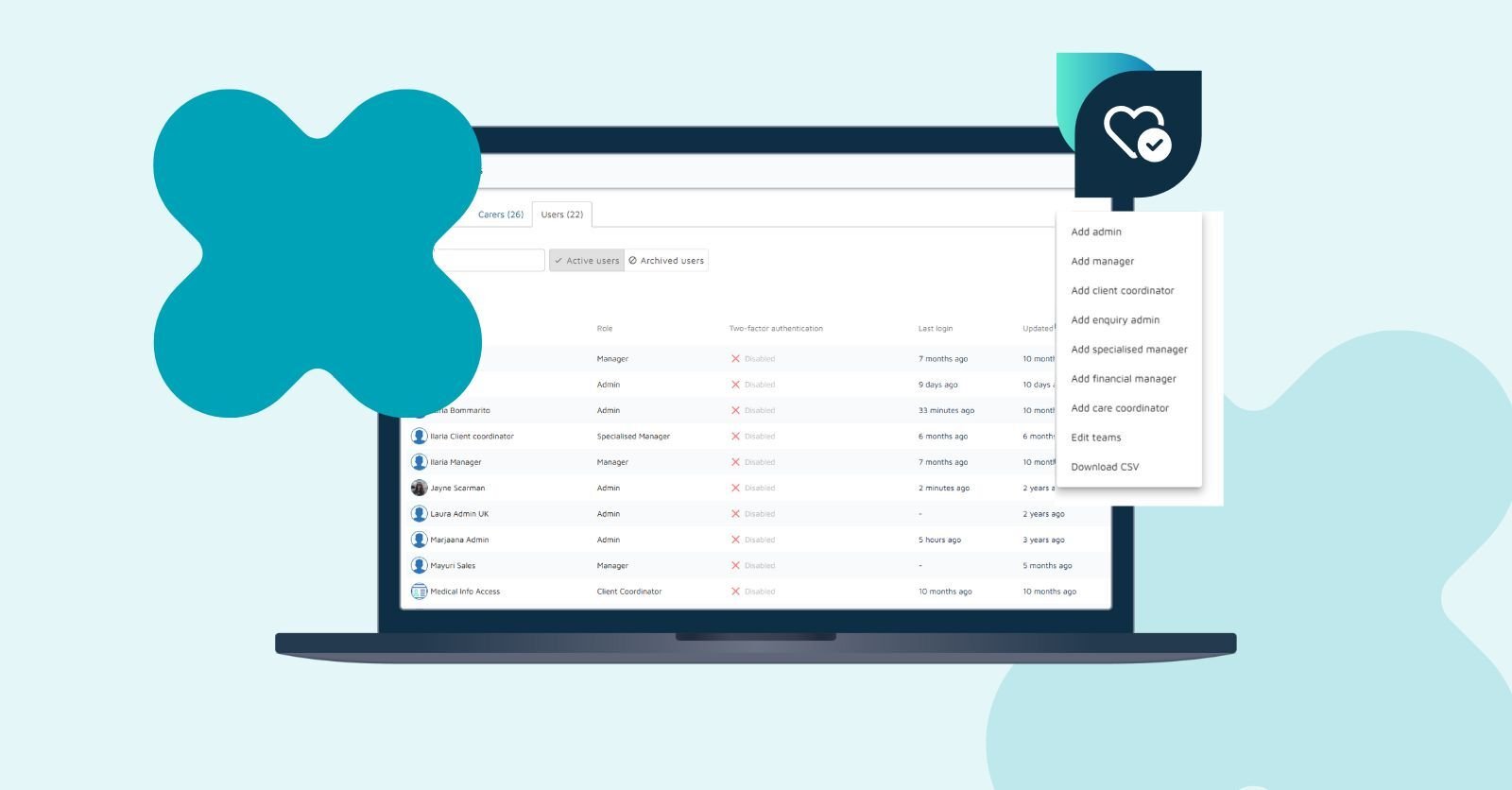
Every homecare team works differently. So our platform lets you set up custom user roles, giving you complete control over who sees and does what across scheduling, client records, carer profiles, finance, and settings.
Why you'll love custom user roles:
-
Tailored access controls: Build roles from scratch or duplicate existing ones to give your team exact permissions in seconds.
-
Total peace of mind: Keep complete visibility over who has access to sensitive care and finance data.
-
Inspection-ready compliance: Pass audits easily with our built-in View Log. It automatically records every permission change; who edited what, which role was changed, and when.
-
Clear team overview: Track exactly how many team members are assigned to each role directly from your settings dashboard.
Our customisable user roles are available on Standard and Pro annual contracts. Take a look at what else is included!
Standard default user roles
Nursebuddy also includes a range of pre-configured roles for organisations looking for immediate, structured access controls out of the box:
👤 Admin
Full system access
Admins have full access to all features within Nursebuddy, including:
- Managing user roles and permissions
- Configuring system settings
- Overseeing payroll and invoicing
- Generating reports and metrics
- Exporting data
Admins have complete control over the Nursebuddy platform's administration within your homecare business.
👥 Manager
Operational oversight with some administrative control
Managers have access to most of Nursebuddy's features, including many admin controls, such as:
- Viewing and managing client and carer profiles
- Scheduling visits
- Handling payroll and invoicing
- Accessing reports and metrics
However, they cannot create or manage other users and have restricted access to certain settings.
📅 Care Coordinator
Scheduling and coordination role
Care Coordinators are responsible for:
- Scheduling visits
- Updating select client and carer information related to scheduling
They do not have access to payroll, invoicing or detailed reports, focusing instead on the visit coverage and the coordination of care services.
📞 Client Coordinator
Focused on client information management
Client Coordinators are responsible for:
- Managing client and carer profiles
- Communicating with clients and carers
They do not have access to scheduling, finance or detailed reports, focusing instead on maintaining accurate and up-to-date client information.
📝 Enquiry Admin
Limited access for client onboarding
Enquiry Admins have a specific role, primarily used by local authorities or external partners. Their access is limited to:
- Creating new client profiles
- Adding basic information to new client records
They cannot view or edit existing client information or access other areas of the platform.
🎯 Specialised Manager
Operational role without financial access
Specialised Managers have similar permissions to Managers, but WITHOUT access to financial information. This includes:
- Viewing and managing client and carer profiles
- Scheduling visits
- Accessing reports and metrics
The Specialised Manager role is suitable for team members who need to manage care operations without handling financial data.
💰 Financial Manager
Focused on financial operations
Financial Managers have access to:
- Payroll and invoicing
- Financial reports
They do not have access to any client or carer information, except where it’s related to financial reporting.
Tips for managing user permissions like a pro
Setting up permissions doesn't have to be complicated! Here are a few quick tips to help you keep things clear, secure, and easy for your team.
-
Standardise role names: Choose clear, descriptive names so your admin team instantly knows who has access to what.
-
Map out access first: Jot down what each job role needs for their day-to-day tasks before building custom roles in Nursebuddy.
-
Limit full admin access: Reserve full admin rights for a small group to keep your account safe and avoid accidental tweaks.
-
Review permissions regularly: Pop into People > Users every now and then to make sure permissions still match your team's current responsibilities.
By understanding and appropriately assigning these user roles, you can ensure that your team members have the access they need to perform their duties effectively while maintaining the security and integrity of your Nursebuddy care management system.
Want to know more? Get in touch!